Novo

Forum kao aplikacija na telefonu

Dodajte forum na početni ekran i koristite ga kao aplikaciju, sa menijem na dnu ekrana.

  • 6 odgovora
  • 4.437 pregleda

Najnovija ↓

Ne standardni fontovi u flashu 07.02.2005. u 22:14 · pre 264 meseca #1
Cudi me zasto niko nije pokrenuo temu vezanu za dodavanje novih fontova u prezentacije, i evo ja cu biti prvi!!
Imam neke fontove koji nisu standardni, i posle kopiranja tih fontova u Control Panel, fonts... da li cu ih tek onda moci da koristim u flashu ili postoji neki drugi nacin za ubacivanje novi fontova naprimer u library (lupam)...

I onda kada ja upotrebim te nove fontove itd. da skratim pricu, da li ce korisnici na drugim masinama moci da vide tekst u tim fontovima u exe fajlu (govorim o CD prezentaciji) ako nisam narezao fontove na CD?
Re: Ne standardni fontovi u flashu 07.02.2005. u 22:43 · pre 264 meseca #3
Opet strava... A da li ce to raditi (kao exe file) na nekoj drugoj masini koja nema taj font? Mislim glupo pitanje, verovatno ce raditi posto je vec ucitan u flash fajl...
Re: Ne standardni fontovi u flashu 07.02.2005. u 23:13 · pre 264 meseca #4
Citat:
dejanc: Opet strava... A da li ce to raditi (kao exe file) na nekoj drugoj masini koja nema taj font? Mislim glupo pitanje, verovatno ce raditi posto je vec ucitan u flash fajl...


Ako korisnik nema font koji si koristio automatski ce biti promenjen u font koji korisnik ima. Najbolji nacin da ovo resis jeste da uradis 2x brake apart.(selektujes tekst i stisnes ctrl+b, ili modify>brake a part)
Re: Ne standardni fontovi u flashu 07.02.2005. u 23:58 · pre 264 meseca #5
Creating font symbols

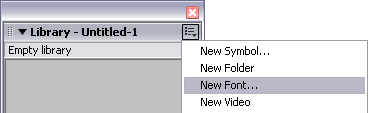
To use a font as a shared library item, you can create a font symbol in the Library panel. You then assign the symbol an identifier string and a URL where the document containing the font symbol will be posted. In this way, you can link to the font and use it in a Flash application.

Note: When using font symbols for dynamic or input text, you must also embed the font outline information. See Setting dynamic and input text options.

For information on linking to a shared font symbol from other documents, see Using shared library assets.

To create a font symbol:

1. Open the library to which you want to add a font symbol.

2. Select New Font from the options menu in the upper right corner of the Library panel.

3. In the Font Symbol Properties dialog box, enter a name for the font symbol in the Name text box.

4. Select a font from the Font menu or enter the name of a font in the Font text box.
If you want to apply a style to the font, select Bold or Italic.

5. Click OK.

To assign an identifier string to a font symbol:

1. Select the font symbol in the Library panel.

2. Do one of the following:

# - Select Linkage from the options menu in the upper right corner of the Library panel.

# - Right-click (Windows) or Control-click (Macintosh) the font symbol name in the Library panel, and select Linkage from the context menu.

3. Under Linkage in the Linkage Properties dialog box, select Export for Runtime Sharing.

4. In the Identifier text box, enter a string to identify the font symbol.

5. In the URL text box, enter the URL where the SWF file that contains the font symbol will be posted.

6. Click OK.

To use the font in a Flash application, copy the font symbol into the destination FLA file. For more information, see Copying library assets between documents.
Potpis
BoxUp
interesantna logička igra
Monty Hall paradoks - interaktivni demo
Re: Ne standardni fontovi u flashu 08.02.2005. u 19:59 · pre 264 meseca #6
Citat:
radoman88: Ako korisnik nema font koji si koristio automatski ce biti promenjen u font koji korisnik ima. Najbolji nacin da ovo resis jeste da uradis 2x brake apart.(selektujes tekst i stisnes ctrl+b, ili modify>brake a part)


I kada ga "razbije" u sta se on pretvara? Hoce li tada raditi?
Prijavite se da biste odgovorili u ovoj temi.PrijavaRegistracija

Premeštanje teme