Re: Gmail 2.0 - novi interfejs
09.12.2008. u 08:55 · pre 217 meseci
#81
Re: Gmail 2.0 - novi interfejs
09.12.2008. u 08:55 · pre 217 meseci
#81
meni posle ovoga više ništa ne treba od Gmaila 
Gmail Tasks!
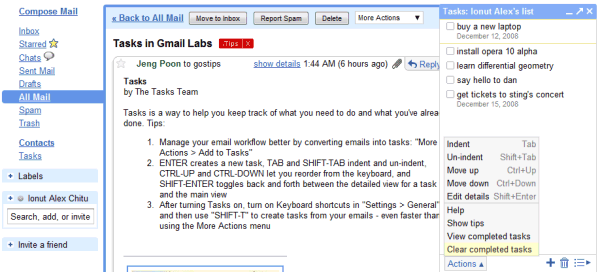
Gmail Tasks!
Citat:
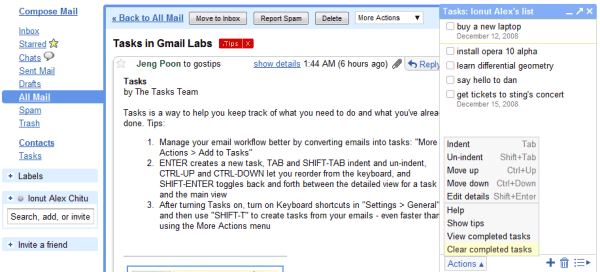
Here are some useful shortcuts in Gmail Tasks:
* Open the tasks box by typing g then k if you have keyboard shortcuts enabled.
* Create a task from an email by pressing Shift+T if you have keyboard shortcuts enabled.
* Navigate between tasks using the arrows.
* Delete a task by deleting the text and hitting backspace.
* Organize your tasks by indenting them — just hit Tab to indent and Shift+Tab to un-indent.
* Ctrl+Up moves a task up the list and Ctrl+Down move it down.
* Hit Shift+Enter when in a task to show its details
* Open the tasks box by typing g then k if you have keyboard shortcuts enabled.
* Create a task from an email by pressing Shift+T if you have keyboard shortcuts enabled.
* Navigate between tasks using the arrows.
* Delete a task by deleting the text and hitting backspace.
* Organize your tasks by indenting them — just hit Tab to indent and Shift+Tab to un-indent.
* Ctrl+Up moves a task up the list and Ctrl+Down move it down.
* Hit Shift+Enter when in a task to show its details