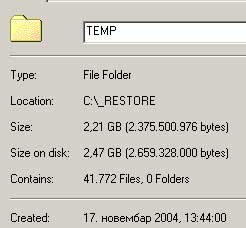
Disejbluj System Restore:
Click Start > Settings > Control Panel.
Double-click the System icon.
On the Performance tab click File System
Click the Troubleshooting tab, and then check Disable System Restore
Click OK. Click Yes, when you are prompted to restart Windows.
Udji u Safe mode, uradi disk Cleanup (sve cekiraj)... pa onda brisi temporary
...a mogao bi i sa nekim Regystry cleanerom da sredis registry
Click Start > Settings > Control Panel.
Double-click the System icon.
On the Performance tab click File System
Click the Troubleshooting tab, and then check Disable System Restore
Click OK. Click Yes, when you are prompted to restart Windows.
Udji u Safe mode, uradi disk Cleanup (sve cekiraj)... pa onda brisi temporary
...a mogao bi i sa nekim Regystry cleanerom da sredis registry