Novo

Forum kao aplikacija na telefonu

Dodajte forum na početni ekran i koristite ga kao aplikaciju, sa menijem na dnu ekrana.

Kako mogu da downloadujem sve jpg fajlove sa servera koji nema html fajlova uopste ?

  • 8 odgovora
  • 2.996 pregleda

Najnovija ↓

Kako mogu da downloadujem sve jpg fajlove sa servera koji nema html fajlova uopste ? 13.03.2013. u 20:35 · pre 165 meseci #1
Kako mogu da downloadujem sve jpg fajlove sa servera koji nema html fajlova uopste. Ja te fajlove mogu da otvorim u browseru normalno kada ukucam link.
Ima ih nekoliko hiljada pa ce mi duuugo trebati da poskidam sve fajlove.

Pokusao sam sa VisualWget ali ne znam sta treba da podesim.
Dobijam gresku pri uspostavljanju konekcije
HTTP request sent, awaiting response... 404 Not Found
2013-03-13 20:32:52 ERROR 404: Not Found.

Pokusavao sam i sa HTTrack i slicnim programima ali bez uspeha
Potpis
Do not try to bend the spoon, that's impossible.
Instead just try to realize the truth.
What truth?
There is no spoon.
There is no spoon?
Then you'll see that is not the spoon that bends, it is only yourself.
Re: Kako mogu da downloadujem sve jpg fajlove sa servera koji nema html fajlova uopste ? 13.03.2013. u 22:31 · pre 165 meseci #2
Pa, napravi html stranu sa tim linkovima pa onda u nekom download manager-u idi na download all links ili kako vec to imaju. Ne mora html strana biti na bas tom serveru :)
Potpis
Nebojsa Milanovic:
-Trumpa smatram vrhunskim predsednikom i voleo bih da živim u državi na čijem je on čelu
-Rusija ne laže, ne vodi osvajačke ratove
-Trump je svetla tačka u USA blatu
-Elon Musk, možda najpametniji i najtrezveniji Amerikanac
Re: Kako mogu da downloadujem sve jpg fajlove sa servera koji nema html fajlova uopste ? 13.03.2013. u 23:05 · pre 165 meseci #4
probao sam cygwin ali nece ni da mi prihvati wget komandu, samo ovo dobijem kada otkucam help

MILAN@MILAN-PC ~
$ help
GNU bash, version 4.1.10(4)-release (i686-pc-cygwin)
These shell commands are defined internally. Type `help' to see this list.
Type `help name' to find out more about the function `name'.
Use `info bash' to find out more about the shell in general.
Use `man -k' or `info' to find out more about commands not in this list.

A star (*) next to a name means that the command is disabled.

job_spec [&] history [-c] [-d offset] [n] or hist>
(( expression )) if COMMANDS; then COMMANDS; [ elif C>
. filename [arguments] jobs [-lnprs] [jobspec ...] or jobs >
: kill [-s sigspec | -n signum | -sigs>
[ arg... ] let arg [arg ...]
[[ expression ]] local [option] name[=value] ...
alias [-p] [name[=value] ... ] logout [n]
bg [job_spec ...] mapfile [-n count] [-O origin] [-s c>
bind [-lpvsPVS] [-m keymap] [-f filen> popd [-n] [+N | -N]
break [n] printf [-v var] format [arguments]
builtin [shell-builtin [arg ...]] pushd [-n] [+N | -N | dir]
caller [expr] pwd [-LP]
case WORD in [PATTERN [| PATTERN]...)> read [-ers] [-a array] [-d delim] [->
cd [-L|-P] [dir] readarray [-n count] [-O origin] [-s>
command [-pVv] command [arg ...] readonly [-af] [name[=value] ...] or>
compgen [-abcdefgjksuv] [-o option] > return [n]
complete [-abcdefgjksuv] [-pr] [-DE] > select NAME [in WORDS ... ;] do COMM>
compopt [-o|+o option] [-DE] [name ..> set [--abefhkmnptuvxBCHP] [-o option>
continue [n] shift [n]
coproc [NAME] command [redirections] shopt [-pqsu] [-o] [optname ...]
declare [-aAfFilrtux] [-p] [name[=val> source filename [arguments]
dirs [-clpv] [+N] [-N] suspend [-f]
disown [-h] [-ar] [jobspec ...] test [expr]
echo [-neE] [arg ...] time [-p] pipeline
enable [-a] [-dnps] [-f filename] [na> times
eval [arg ...] trap [-lp] [[arg] signal_spec ...]
exec [-cl] [-a name] [command [argume> true
exit [n] type [-afptP] name [name ...]
export [-fn] [name[=value] ...] or ex> typeset [-aAfFilrtux] [-p] name[=val>
false ulimit [-SHacdefilmnpqrstuvx] [limit>
fc [-e ename] [-lnr] [first] [last] o> umask [-p] [-S] [mode]
fg [job_spec] unalias [-a] name [name ...]
for NAME [in WORDS ... ] ; do COMMAND> unset [-f] [-v] [name ...]
for (( exp1; exp2; exp3 )); do COMMAN> until COMMANDS; do COMMANDS; done
function name { COMMANDS ; } or name > variables - Names and meanings of so>
getopts optstring name [arg] wait [id]
hash [-lr] [-p pathname] [-dt] [name > while COMMANDS; do COMMANDS; done
help [-dms] [pattern ...] { COMMANDS ; }
Potpis
Do not try to bend the spoon, that's impossible.
Instead just try to realize the truth.
What truth?
There is no spoon.
There is no spoon?
Then you'll see that is not the spoon that bends, it is only yourself.
Re: Kako mogu da downloadujem sve jpg fajlove sa servera koji nema html fajlova uopste ? 13.03.2013. u 23:09 · pre 165 meseci #5
problem je sto linkovi nisu objavljeni do fotografija u rezoluciji koje mi trebaju.

Npr jedan link je

http://adresa.com/images/0/1/1/127110_EDMO_300.jpg a meni treba da otvorim taj fajl u vecoj rezoluciji na
http://adresa.com/images/0/1/1/127110_EDMO_640.jpg

do linkova mogu da dodjem kad otvaram jednu po jednu stranicu a ima ih oko 1000 pa je to bas veliki posao
Potpis
Do not try to bend the spoon, that's impossible.
Instead just try to realize the truth.
What truth?
There is no spoon.
There is no spoon?
Then you'll see that is not the spoon that bends, it is only yourself.
Re: Kako mogu da downloadujem sve jpg fajlove sa servera koji nema html fajlova uopste ? 14.03.2013. u 09:55 · pre 165 meseci #6
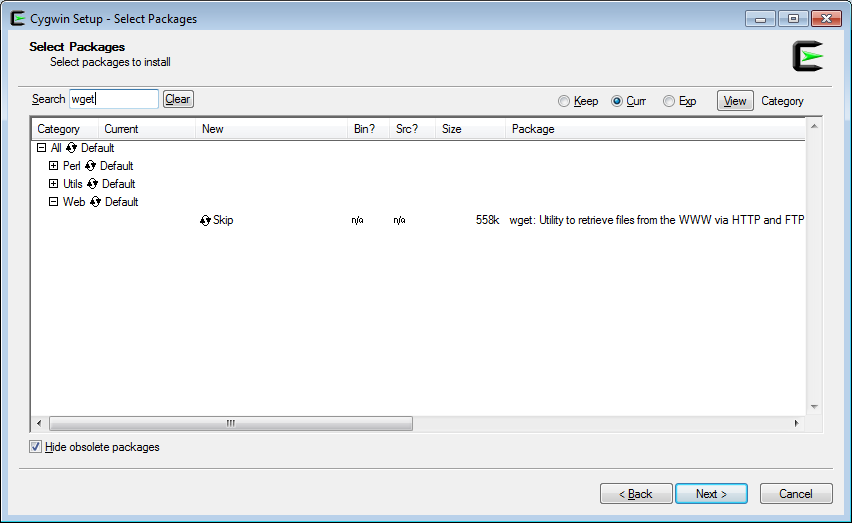
wget bi trebalo da budeo deo nekog paketa. Pogledaj mozda je unutar Web.

Citat:
Milan Pavlovic: probao sam cygwin ali nece ni da mi prihvati wget komandu, samo ovo dobijem kada otkucam help

MILAN@MILAN-PC ~
$ help
GNU bash, version 4.1.10(4)-release (i686-pc-cygwin)
These shell commands are defined internally. Type `help' to see this list.
Type `help name' to find out more about the function `name'.
Use `info bash' to find out more about the shell in general.
Use `man -k' or `info' to find out more about commands not in this list.

A star (*) next to a name means that the command is disabled.

job_spec [&] history [-c] [-d offset] [n] or hist>
(( expression )) if COMMANDS; then COMMANDS; [ elif C>
. filename [arguments] jobs [-lnprs] [jobspec ...] or jobs >
: kill [-s sigspec | -n signum | -sigs>
[ arg... ] let arg [arg ...]
[[ expression ]] local [option] name[=value] ...
alias [-p] [name[=value] ... ] logout [n]
bg [job_spec ...] mapfile [-n count] [-O origin] [-s c>
bind [-lpvsPVS] [-m keymap] [-f filen> popd [-n] [+N | -N]
break [n] printf [-v var] format [arguments]
builtin [shell-builtin [arg ...]] pushd [-n] [+N | -N | dir]
caller [expr] pwd [-LP]
case WORD in [PATTERN [| PATTERN]...)> read [-ers] [-a array] [-d delim] [->
cd [-L|-P] [dir] readarray [-n count] [-O origin] [-s>
command [-pVv] command [arg ...] readonly [-af] [name[=value] ...] or>
compgen [-abcdefgjksuv] [-o option] > return [n]
complete [-abcdefgjksuv] [-pr] [-DE] > select NAME [in WORDS ... ;] do COMM>
compopt [-o|+o option] [-DE] [name ..> set [--abefhkmnptuvxBCHP] [-o option>
continue [n] shift [n]
coproc [NAME] command [redirections] shopt [-pqsu] [-o] [optname ...]
declare [-aAfFilrtux] [-p] [name[=val> source filename [arguments]
dirs [-clpv] [+N] [-N] suspend [-f]
disown [-h] [-ar] [jobspec ...] test [expr]
echo [-neE] [arg ...] time [-p] pipeline
enable [-a] [-dnps] [-f filename] [na> times
eval [arg ...] trap [-lp] [[arg] signal_spec ...]
exec [-cl] [-a name] [command [argume> true
exit [n] type [-afptP] name [name ...]
export [-fn] [name[=value] ...] or ex> typeset [-aAfFilrtux] [-p] name[=val>
false ulimit [-SHacdefilmnpqrstuvx] [limit>
fc [-e ename] [-lnr] [first] [last] o> umask [-p] [-S] [mode]
fg [job_spec] unalias [-a] name [name ...]
for NAME [in WORDS ... ] ; do COMMAND> unset [-f] [-v] [name ...]
for (( exp1; exp2; exp3 )); do COMMAN> until COMMANDS; do COMMANDS; done
function name { COMMANDS ; } or name > variables - Names and meanings of so>
getopts optstring name [arg] wait [id]
hash [-lr] [-p pathname] [-dt] [name > while COMMANDS; do COMMANDS; done
help [-dms] [pattern ...] { COMMANDS ; }
Re: Kako mogu da downloadujem sve jpg fajlove sa servera koji nema html fajlova uopste ? 14.03.2013. u 12:10 · pre 165 meseci #8
e pa nisam to podesio u instalaciji, hvala puno, sad cu probati
Potpis
Do not try to bend the spoon, that's impossible.
Instead just try to realize the truth.
What truth?
There is no spoon.
There is no spoon?
Then you'll see that is not the spoon that bends, it is only yourself.
Re: Kako mogu da downloadujem sve jpg fajlove sa servera koji nema html fajlova uopste ? 14.03.2013. u 22:36 · pre 165 meseci #9
...239.78|:80... connected.
HTTP request sent, awaiting response... 404 Not Found
2013-03-14 22:18:12 ERROR 404: Not Found.

opet to dobijem, konektujem se ali nece dalje.

kako mogu da mu zadam komandu npr da se zakaci preko ftp kao anonymous user

Preko cygwin sam ovo pokusao, samo mi nije jasno sta da upisem tj kako da formulisem ono sto traba da upisem umesto /save/location
Potpis
Do not try to bend the spoon, that's impossible.
Instead just try to realize the truth.
What truth?
There is no spoon.
There is no spoon?
Then you'll see that is not the spoon that bends, it is only yourself.
Prijavite se da biste odgovorili u ovoj temi.PrijavaRegistracija

Premeštanje teme