Imam jedan problem sa antivirusom KAV 6.0mp4 winwksen, posto sam vršio ponovnu instalaciju windowsa xp nakon istalacije windowsa instalirao sam navedeni antivirus racunar radi perfektno ali imam problem kada odem na internet antivirus usporava firefox i youtub kada pustim neki klip na youtubu ono koci trza a kada iskljucim antivirus radi normalno inace imam racunar 1.7 GHz RAM 1GB brzina interneta 2.5 MB, i da napomnem antivirus KAV 6.0mp4 winwksen je kupovna verzija a ne krekovana ako to nesto zanci, ako neko moze neka da neki savijet hitno mi je ovo da rijesim.....
KAV 6.0mp4 winwksen (savijet hitno)
Zaključano
Zakačeno
Najlakše je ažurirati antivirus do poslednje verzije(2012).
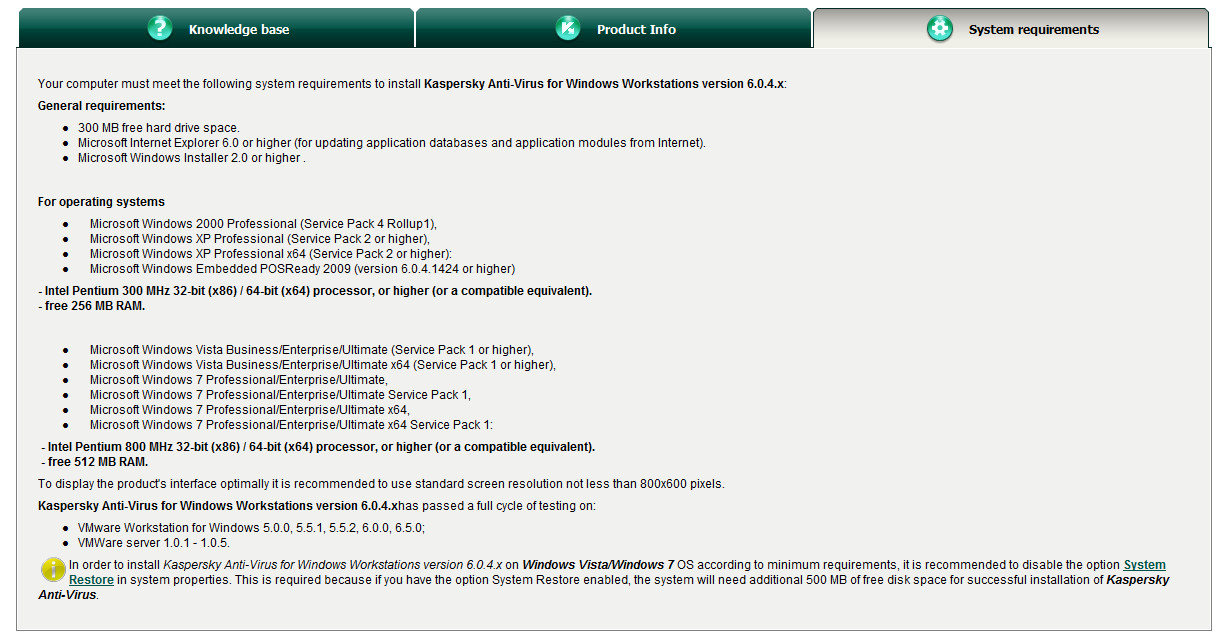
Prvo sam morao da potrazim o kojoj se verziji radi. Pretpostavljam da je ova:
Kaspersky Anti-Virus for Windows Workstations version 6.0.4.x http://support.kaspersky.com/wks6mp4?level=2 a sta ce mp4 u imenu ne znam ni sam...
@Dashkes
kako ide to sa licenciranjem kod KAV da li mora da doplati ili kupi novu licencu ako hoce KAV v2012?
Kaspersky Anti-Virus for Windows Workstations version 6.0.4.x http://support.kaspersky.com/wks6mp4?level=2 a sta ce mp4 u imenu ne znam ni sam...
@Dashkes
kako ide to sa licenciranjem kod KAV da li mora da doplati ili kupi novu licencu ako hoce KAV v2012?
Citat:
This FAQ describes what to do in case your Internet browser cannot open web pages or displays them incorrectly after installing Kaspersky Anti-Virus 6.0.4.x for Windows Workstations.
Before submitting a Technical Support request:
* try using another browser.
For example if you are using MS Internet Explorer, try opening web pages with Mozilla FireFox;
* try to find out the Kaspersky Anti-Virus component responsible for the issue.
For example, open Kaspersky Anti-Virus, and disable the component Web Anti-Virus and try opening a web page, etc;
Test all the other components until you find a right one.
How to submit a request to the Technical Support:
o Disable the application Self-defense<.
o Enable the Notify (500) level tracing using the utility KavLogMP4 or in Kaspersky Anti-Virus GUI.
o Create a folder named http on the disk C: (S:\http).
o Download the file HTTP_panzl6mp4.zip and run the file Trace_httpanzl_ON.reg.
o Reboot the computer (or restart Kaspersky Anti-Virus).
o Save Kaspersky Anti-Virus settings to a file (click Settings > Protection > button Save).
o Reproduce the problem: try opening an “issuing” webpage in a browser.
o Make a screenshot of the “issuing” webpage.
o Close the browser.
o Compress all files in the folder C:\http into an archive. Delete all files from this folder except the archive file you have just created.
o Run the file Trace_httpanzl_OFF.reg from the archive HTTP_panzl6mp4.zip.
o Reboot the computer (or restart Kaspersky Anti-Virus).
o Disable the tracing using the utility KavLogMP4 (or via Kaspersky Anti-Virus GUI).
o Use the utility GetSystemInfo to generate a report about your system.
o Send the files (archives, GetSystemInfo report) with a description of the problem to Kaspersky Lab Technical support service by submitting a HelpDesk request.
Before submitting a Technical Support request:
* try using another browser.
For example if you are using MS Internet Explorer, try opening web pages with Mozilla FireFox;
* try to find out the Kaspersky Anti-Virus component responsible for the issue.
For example, open Kaspersky Anti-Virus, and disable the component Web Anti-Virus and try opening a web page, etc;
Test all the other components until you find a right one.
How to submit a request to the Technical Support:
o Disable the application Self-defense<.
o Enable the Notify (500) level tracing using the utility KavLogMP4 or in Kaspersky Anti-Virus GUI.
o Create a folder named http on the disk C: (S:\http).
o Download the file HTTP_panzl6mp4.zip and run the file Trace_httpanzl_ON.reg.
o Reboot the computer (or restart Kaspersky Anti-Virus).
o Save Kaspersky Anti-Virus settings to a file (click Settings > Protection > button Save).
o Reproduce the problem: try opening an “issuing” webpage in a browser.
o Make a screenshot of the “issuing” webpage.
o Close the browser.
o Compress all files in the folder C:\http into an archive. Delete all files from this folder except the archive file you have just created.
o Run the file Trace_httpanzl_OFF.reg from the archive HTTP_panzl6mp4.zip.
o Reboot the computer (or restart Kaspersky Anti-Virus).
o Disable the tracing using the utility KavLogMP4 (or via Kaspersky Anti-Virus GUI).
o Use the utility GetSystemInfo to generate a report about your system.
o Send the files (archives, GetSystemInfo report) with a description of the problem to Kaspersky Lab Technical support service by submitting a HelpDesk request.
http://support.kaspersky.com/w...error?page=1&qid=208280846
Pitanje je - Dal uopste moze da njegov racunar radi lepo sa KAV 2012 ?
Ne, pitanje je sto mu ne radi internet 
.
?
Citat:
inace imam racunar 1.7 GHz RAM 1GB brzina interneta 2.5 MB,
?
Za najnoviji kav/kis ti treba 1gb,tako da bi verovatno stucalo kao i sa tom tvojom verzijom.Probaj drugi browser posto ff hoce da povuce dosta resursa,a ako ne bude bolje,stavi neki drugi "laksi" av.
@Goran
Net mu radi,samo je usporen.
@Goran
Net mu radi,samo je usporen.
Tema je zaključana, nove poruke nisu moguće.