Da li postoji mogucnost da se vrati sadrzaj presnimljenog word dokumenta(.doc). Recimo da sam imao dokument od 50 strana i slucajno, greskom, izbrisem sve osim prve strane i kliknem "save". Nakon toga na tom dokumentu/particiji nije bilo nikakvih upisa/izmena. Znaci samo je jednom presnimljen sadrzaj celog dokumenta. U temp folderu nema ni traga od pomenutog file-a. Potrebno je, prakticno, izvuci prethodnu verziju file-a, u pitanju je word 2003 i windowsXPproSP2.
Kako vratiti presnimljen word dokument?
Zaključano
Zakačeno
Koliko ja znam tako nesto ne postoji. Da si ga izbrisao mogao bi da ga vratis prakticno bez problema, uz malo vise truda i vremena ali ovako kada si ga presnimio mislim da si ga zeznuo za sva vremena.
Voleo bih da gresim ali...
Voleo bih da gresim ali...
Izmenjeni sadržaj dokumenta snimljen pod istim nazivom fajla nije moguće povratiti nikakvim data recovery programom, osim vrlo skupom opremom / metodama koje koriste forenzičari, što definitivno ne predstavlja rešenje u tvom slučaju.

Prouci ovo: http://en.wikipedia.org/wiki/Shadow_Copy
http://en.kioskea.net/faq/suje...volume-shadow-copy#short-intro
Ne znam hoce li ista uspeti u win XP. Za Vistu postoji i program ShadowExplorer http://www.shadowexplorer.com/
http://en.kioskea.net/faq/suje...volume-shadow-copy#short-intro
Ne znam hoce li ista uspeti u win XP. Za Vistu postoji i program ShadowExplorer http://www.shadowexplorer.com/
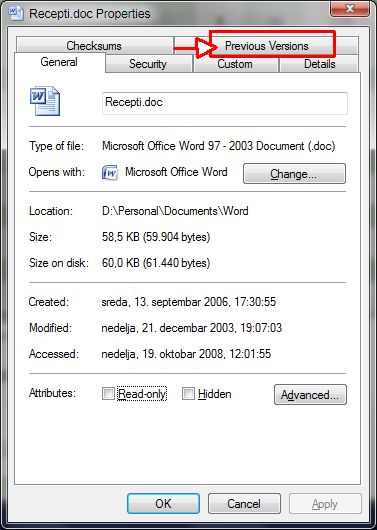
Istina Vista i Win7 nude tzv. Previous Versions (desni klik na fajl, pa Properties), ali ne verujem da će to u ovom slučaju da upali pošto se to uglavnom odnosi na sistemske fajlove, a ne na lične dokumente

Citat:
What are previous versions?
Previous versions are either copies of files and folders created by Windows Backup or copies of files and folders that Windows automatically saves as part of a restore point. You can use previous versions to restore files and folders that you accidentally modified or deleted, or that were damaged. Depending on the type of file or folder, you can open, save to a different location, or restore a previous version.
How are previous versions created?
Previous versions are automatically saved as part of a restore point. If system protection is turned on, Windows automatically creates previous versions of files and folders that have been modified since the last restore point was made. Typically, restore points are made once a day. If your disk is partitioned or if you have more than one hard disk on your computer, you need to turn on system protection for the other partitions or disks. Previous versions are also created by Windows Backup when you back up your files.
Note
If you modify a file several times in one day, only the version that was current when the restore point or backup was made is saved as a previous version.
Previous versions are either copies of files and folders created by Windows Backup or copies of files and folders that Windows automatically saves as part of a restore point. You can use previous versions to restore files and folders that you accidentally modified or deleted, or that were damaged. Depending on the type of file or folder, you can open, save to a different location, or restore a previous version.
How are previous versions created?
Previous versions are automatically saved as part of a restore point. If system protection is turned on, Windows automatically creates previous versions of files and folders that have been modified since the last restore point was made. Typically, restore points are made once a day. If your disk is partitioned or if you have more than one hard disk on your computer, you need to turn on system protection for the other partitions or disks. Previous versions are also created by Windows Backup when you back up your files.
Note
If you modify a file several times in one day, only the version that was current when the restore point or backup was made is saved as a previous version.
Probaj da pretrazis po datumu preko F3 u Windows.
Moguce je da je sam Word napravio back up
pogledaj ovde
http://www.techsupportforum.co...automatic-backup-location.html
dopuna
http://support.microsoft.com/kb/827099
Moguce je da je sam Word napravio back up
pogledaj ovde
http://www.techsupportforum.co...automatic-backup-location.html
dopuna
http://support.microsoft.com/kb/827099