izmenjeno 2 puta, poslednji put PavleBgd 09.09.2006. u 09:41
Izmene poruke
- PavleBgd09.09.2006. u 09:41zapis iz teksta poruke
- PavleBgd03.09.2006. u 20:13zapis iz teksta poruke
Posto imam jos pitanja u vezi Ogre-a sugerisano mi je da otvorim drugu temu(hvala franticnick na iscrpnom odgovoru).
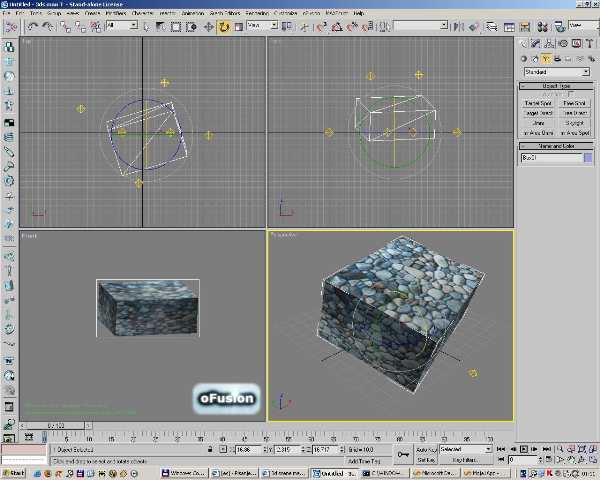
U 3DSMax sam kreirao jednostavni objekat (kocku). Dodao sam mu materijal (BeachStones.jpg koji se nalazi u ..\media\materials\textures OgreSDK paketa). U Render prozoru kao i pomocu oFusion paketa se u Max-u objekat noramlno vidi (sa teksturom).
Objekat sam zatim eksportovao u XML pomocu OgreMaxExportera i konvertovao ga u mesh koristeci OGREXMLConverter ("kocka.mesh")
U CreateScene() metod aplikacije sam dodao sledeci kod:
U Materials script sam dodao opis materijala:
Evo ga isecak iz ogre.log-a (oznaceno sa >>>):
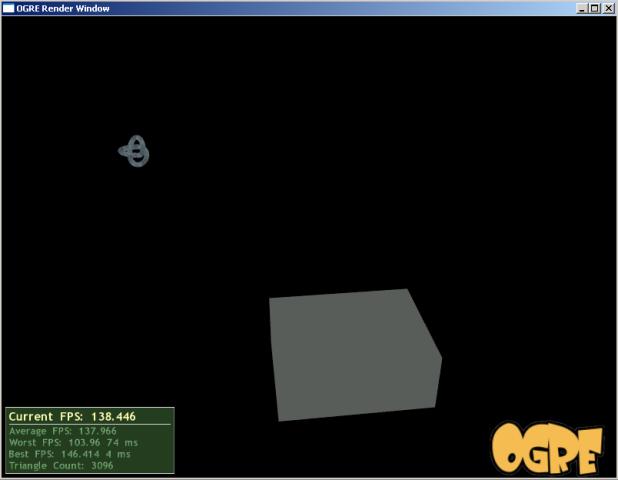
Kada pokrenem aplikaciju kocka se pojavi na pravom mestu. Medjutim kocka nema teksturu, vec je samo sive boje? Ono sto je interesantno je da pored ovoga je prikazan sasvim normalno drugi objekat (knot.mesh) sa teksturom.
Kako da mi se normalno prikaze tekstura na objektu (onako kako se to vidi uz pomoc oFusion-a u Maxu)?
Pozdrav
U 3DSMax sam kreirao jednostavni objekat (kocku). Dodao sam mu materijal (BeachStones.jpg koji se nalazi u ..\media\materials\textures OgreSDK paketa). U Render prozoru kao i pomocu oFusion paketa se u Max-u objekat noramlno vidi (sa teksturom).
Objekat sam zatim eksportovao u XML pomocu OgreMaxExportera i konvertovao ga u mesh koristeci OGREXMLConverter ("kocka.mesh")
U CreateScene() metod aplikacije sam dodao sledeci kod:
Code:
mSceneMgr->setAmbientLight( ColourValue( 1.0f, 1.0f, 1.0f ) );
ent = mSceneMgr->createEntity( "Kocka", "kocka.mesh" );
node = mSceneMgr->getRootSceneNode( )->createChildSceneNode( "KockaNode", Vector3( 0.0f, -10.0f, 25.0f ) );
node->attachObject( ent );
node->setScale( 0.2f, 0.2f, 0.2f );
ent = mSceneMgr->createEntity( "Knot1", "knot.mesh" );
node = mSceneMgr->getRootSceneNode( )->createChildSceneNode( "Knot1Node", Vector3( 0.0f, 0.0f, 100.0f ) );
node->attachObject( ent );
node->setScale( 0.1f, 0.1f, 0.1f );
mSceneMgr->setAmbientLight( ColourValue( 1.0f, 1.0f, 1.0f ) );
ent = mSceneMgr->createEntity( "Kocka", "kocka.mesh" );
node = mSceneMgr->getRootSceneNode( )->createChildSceneNode( "KockaNode", Vector3( 0.0f, -10.0f, 25.0f ) );
node->attachObject( ent );
node->setScale( 0.2f, 0.2f, 0.2f );
ent = mSceneMgr->createEntity( "Knot1", "knot.mesh" );
node = mSceneMgr->getRootSceneNode( )->createChildSceneNode( "Knot1Node", Vector3( 0.0f, 0.0f, 100.0f ) );
node->attachObject( ent );
node->setScale( 0.1f, 0.1f, 0.1f );
U Materials script sam dodao opis materijala:
Code:
material KockaSkin
{
technique
{
pass
{
texture_unit
{
texture BeachStones.jpg
}
}
}
}
material KockaSkin
{
technique
{
pass
{
texture_unit
{
texture BeachStones.jpg
}
}
}
}
Evo ga isecak iz ogre.log-a (oznaceno sa >>>):
Code:
18:39:45: Parsing script Example-Water.overlay
18:39:45: Parsing script Shadows.overlay
18:39:45: Finished parsing scripts for resource group General
>>> 18:39:45: Mesh: Loading kocka.mesh.
>>> 18:39:45: Texture: BeachStones.jpg: Loading 1 faces(PF_B8G8R8,512x512x1) with hardware generated mipmaps from Image. Internal format is PF_X8R8G8B8,512x512x1.
18:39:45: Mesh: Loading knot.mesh.
18:39:45: D3D9 : ***** Dimensions altered by the render system
18:39:45: D3D9 : ***** Source image dimensions : 780x511
18:39:45: D3D9 : ***** Texture dimensions : 1024x512
18:39:45: Texture: MtlPlat2.jpg: Loading 1 faces(PF_B8G8R8,780x511x1) with 5 generated mipmaps from Image. Internal format is PF_X8R8G8B8,1024x512x1.
18:39:46: Win32Input8: DirectInput Activation Starts
18:39:45: Parsing script Example-Water.overlay
18:39:45: Parsing script Shadows.overlay
18:39:45: Finished parsing scripts for resource group General
>>> 18:39:45: Mesh: Loading kocka.mesh.
>>> 18:39:45: Texture: BeachStones.jpg: Loading 1 faces(PF_B8G8R8,512x512x1) with hardware generated mipmaps from Image. Internal format is PF_X8R8G8B8,512x512x1.
18:39:45: Mesh: Loading knot.mesh.
18:39:45: D3D9 : ***** Dimensions altered by the render system
18:39:45: D3D9 : ***** Source image dimensions : 780x511
18:39:45: D3D9 : ***** Texture dimensions : 1024x512
18:39:45: Texture: MtlPlat2.jpg: Loading 1 faces(PF_B8G8R8,780x511x1) with 5 generated mipmaps from Image. Internal format is PF_X8R8G8B8,1024x512x1.
18:39:46: Win32Input8: DirectInput Activation Starts
Kada pokrenem aplikaciju kocka se pojavi na pravom mestu. Medjutim kocka nema teksturu, vec je samo sive boje? Ono sto je interesantno je da pored ovoga je prikazan sasvim normalno drugi objekat (knot.mesh) sa teksturom.
Kako da mi se normalno prikaze tekstura na objektu (onako kako se to vidi uz pomoc oFusion-a u Maxu)?
Pozdrav