Imam tabelu sa kolonom nasih stringova u cirilici PO, GO,NS itd .treba da izvrsim poredjenje ove kolone sa nasim stringovima i da se izvrsi ako je ova kolona ista sa stringom upis opet nasih stringova u trecu kolonu. kad kucam nasa slova u VBA editoru dobijam neke simbole kao ÃÎ, ÏÎ itd. Da li je moguce uraditi ovo sa nekom funkcijom ili tako nesto?
koriscenje cirilicnih slova u vba
Zaključano
Zakačeno
VBA ne podrzava UTF-8 kako treba te tako iz tog razloga ces imate ASCII varijante tih slova kao sto s' naveo.
Takodje ako je string UTF-8 moze da se desi da je slovo 2 bytes zbog standarda.
U sustini ili da radis konverziju ili da ih poredis kako jeste s' tim da obratis paznju na raspored bytova.
Ako imas neke uzorke pusti mi pa da vidim ako stignem i nadjem vremena da vidim da napravim neki primer za to.
Znaci, uzorak podataka i sta treba da se dobije (ideja sta treba da se uradi aka. zamisao).
Ne obecavam ali opet nije problem ako nadjem vremena da pomognem.
Takodje ako je string UTF-8 moze da se desi da je slovo 2 bytes zbog standarda.
U sustini ili da radis konverziju ili da ih poredis kako jeste s' tim da obratis paznju na raspored bytova.
Ako imas neke uzorke pusti mi pa da vidim ako stignem i nadjem vremena da vidim da napravim neki primer za to.
Znaci, uzorak podataka i sta treba da se dobije (ideja sta treba da se uradi aka. zamisao).
Ne obecavam ali opet nije problem ako nadjem vremena da pomognem.
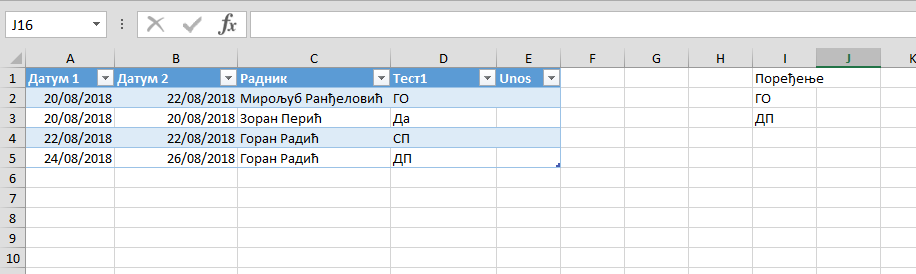
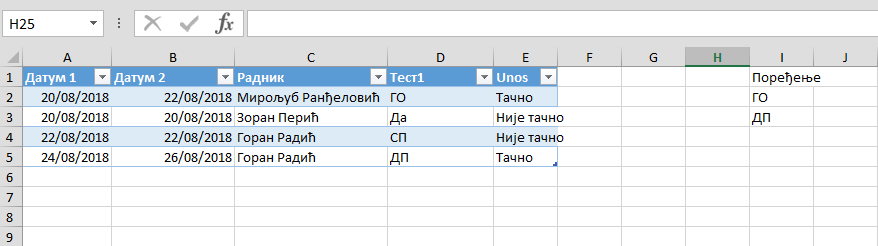
Saljem tabelu kako bi trebalo da izgleda. KAd je neko polje u koloni Test1 jednako sa poljima u koloni Poredjenje u koloni Unos se stavlja Tacnoili netacno ako nije pronadjeno.
Evo brzinskog resenje posto nije sve bas definisano ali opet sasvim dovoljno da se odradi do kraja i implementiran sta se hoce.
Bitno je da se odradi ono sto sam naveo na pocetku sto se tice sistemskih podesavanja da bi moglo da se radi sa nasim slovima u VBA posto isti ne podrzava UTF-8 i Unicode na nacin kako se sada radi i praktikuje.
U prilogu je Excel file sa VBA kodom koji se takodje nalazi dole kao text.
Pored toga su i dva screenshot cisto eto da se vidi da kod radi.
Odradjena su dva primera i nacina kako se proverava vrednost, kao BOOL i kao VALUE.
Trenutno je postavljen primer da radi sa VALUE varijantom ali je ostavljen i BOOL samo iskljucen u kodu.
BOOL primer vraca TRUE ili FALSE za vrednost, VALUE primer vraca odgovarajucu vrednost, ako nema tj. FALSE onda vraca podrazumevanu vrednost koja se isto moze predefinisati prilikom pozivanja iste.
Ovde nasa slova nece biti prikazana kako treba.
Vrednosti su:
Tačno -> Òà÷íî
Nije tačno -> Íè¼å òà÷íî
Bitno je da se odradi ono sto sam naveo na pocetku sto se tice sistemskih podesavanja da bi moglo da se radi sa nasim slovima u VBA posto isti ne podrzava UTF-8 i Unicode na nacin kako se sada radi i praktikuje.
U prilogu je Excel file sa VBA kodom koji se takodje nalazi dole kao text.
Pored toga su i dva screenshot cisto eto da se vidi da kod radi.
Odradjena su dva primera i nacina kako se proverava vrednost, kao BOOL i kao VALUE.
Trenutno je postavljen primer da radi sa VALUE varijantom ali je ostavljen i BOOL samo iskljucen u kodu.
BOOL primer vraca TRUE ili FALSE za vrednost, VALUE primer vraca odgovarajucu vrednost, ako nema tj. FALSE onda vraca podrazumevanu vrednost koja se isto moze predefinisati prilikom pozivanja iste.
Ovde nasa slova nece biti prikazana kako treba.
Vrednosti su:
Tačno -> Òà÷íî
Nije tačno -> Íè¼å òà÷íî
Code:
Sub DoTask4Me()
' Before use this code you should apply changes in to system settings
' Control Panel -> Region and Language
' In 'Administrative' tab, section 'Language for non-Unicode programs', click on button 'Change system locale...'
' Select 'Serbian (Cyrlic, Serbia)
' After applying this, workstation should be restarted!
' Same process goes and for Serbian (Latin, Serbia)
' Only one at time can be used.
' Notes: In some cases maybe will ask for Windows OS install media to collect files which are missing.
Dim pSheet As Worksheet
Dim mSifarnik As Collection
Dim i As Integer
Dim iCol As Integer
Dim iTotalRows As Long
Dim iValueCol As Integer
Set pSheet = ActiveWorkbook.ActiveSheet
' --> Example of creating unique list of values which should be checked <--
' Column number for unique list of values in sheet
iCol = 9
' Create new instance of object
Set mSifarnik = New Collection
' Create 'Sifarnik' where item key is value from cell and value of item in collection is value which will be set as return value of checking function
With mSifarnik
' Add item to collection
.Add "Òà÷íî", Cells(2, iCol)
' Add item to collection
.Add "Òà÷íî", Cells(3, iCol)
End With
' --> Example of going over list of cells and check items for values and set appropriate value <--
' Get total number of rows in sheet
iTotalRows = pSheet.UsedRange.Columns(1).Rows.Count
' Set value to column
iValueCol = 5
For i = 2 To iTotalRows
' ' Version 1 -- Using bool function for checking item
' ' If item is present in list then
' If IsItemPresentBool(mSifarnik, pSheet.Cells(i, 4)) = True Then
'
' ' Set value in cell
' pSheet.Cells(i, iValueCol) = "Òà÷íî"
'
' ' If item isn't present in list then
' Else
'
' ' Set value in cell
' pSheet.Cells(i, iValueCol) = "Íè¼å òà÷íî"
'
' End If
' Version 2 -- Using return as value set function for checking item
pSheet.Cells(i, iValueCol) = IsItemPresentValue(mSifarnik, pSheet.Cells(i, 4))
Next
' Free memory resource
Set mSifarnik = Nothing
Set pSheet = Nothing
End Sub
' Version 1
Private Function IsItemPresentBool(ByRef ThisCol As Collection, ByRef ThisValue As String) As Boolean
On Error Resume Next
Dim r As String
' Try to get item from collection
r = ThisCol.Item(ThisValue)
' If there any error e.g. not present then
If Err.Number <> 0 Then
Err.Clear
' Return value
IsItemPresentBool = False
Else
' Return value
IsItemPresentBool = True
End If
End Function
' Version 2
Private Function IsItemPresentValue(ByRef ThisCol As Collection, ByRef ThisValue As String, Optional ByVal ReturnDefaultValue As String = "Íè¼å òà÷íî") As String
On Error Resume Next
Dim r As String
' Try to get item from collection
r = ThisCol.Item(ThisValue)
' If there any error e.g. not present then
If Err.Number <> 0 Then
Err.Clear
' Return value
IsItemPresentValue = ReturnDefaultValue
Else
' Return value
IsItemPresentValue = r
End If
End Function
Sub DoTask4Me()
' Before use this code you should apply changes in to system settings
' Control Panel -> Region and Language
' In 'Administrative' tab, section 'Language for non-Unicode programs', click on button 'Change system locale...'
' Select 'Serbian (Cyrlic, Serbia)
' After applying this, workstation should be restarted!
' Same process goes and for Serbian (Latin, Serbia)
' Only one at time can be used.
' Notes: In some cases maybe will ask for Windows OS install media to collect files which are missing.
Dim pSheet As Worksheet
Dim mSifarnik As Collection
Dim i As Integer
Dim iCol As Integer
Dim iTotalRows As Long
Dim iValueCol As Integer
Set pSheet = ActiveWorkbook.ActiveSheet
' --> Example of creating unique list of values which should be checked <--
' Column number for unique list of values in sheet
iCol = 9
' Create new instance of object
Set mSifarnik = New Collection
' Create 'Sifarnik' where item key is value from cell and value of item in collection is value which will be set as return value of checking function
With mSifarnik
' Add item to collection
.Add "Òà÷íî", Cells(2, iCol)
' Add item to collection
.Add "Òà÷íî", Cells(3, iCol)
End With
' --> Example of going over list of cells and check items for values and set appropriate value <--
' Get total number of rows in sheet
iTotalRows = pSheet.UsedRange.Columns(1).Rows.Count
' Set value to column
iValueCol = 5
For i = 2 To iTotalRows
' ' Version 1 -- Using bool function for checking item
' ' If item is present in list then
' If IsItemPresentBool(mSifarnik, pSheet.Cells(i, 4)) = True Then
'
' ' Set value in cell
' pSheet.Cells(i, iValueCol) = "Òà÷íî"
'
' ' If item isn't present in list then
' Else
'
' ' Set value in cell
' pSheet.Cells(i, iValueCol) = "Íè¼å òà÷íî"
'
' End If
' Version 2 -- Using return as value set function for checking item
pSheet.Cells(i, iValueCol) = IsItemPresentValue(mSifarnik, pSheet.Cells(i, 4))
Next
' Free memory resource
Set mSifarnik = Nothing
Set pSheet = Nothing
End Sub
' Version 1
Private Function IsItemPresentBool(ByRef ThisCol As Collection, ByRef ThisValue As String) As Boolean
On Error Resume Next
Dim r As String
' Try to get item from collection
r = ThisCol.Item(ThisValue)
' If there any error e.g. not present then
If Err.Number <> 0 Then
Err.Clear
' Return value
IsItemPresentBool = False
Else
' Return value
IsItemPresentBool = True
End If
End Function
' Version 2
Private Function IsItemPresentValue(ByRef ThisCol As Collection, ByRef ThisValue As String, Optional ByVal ReturnDefaultValue As String = "Íè¼å òà÷íî") As String
On Error Resume Next
Dim r As String
' Try to get item from collection
r = ThisCol.Item(ThisValue)
' If there any error e.g. not present then
If Err.Number <> 0 Then
Err.Clear
' Return value
IsItemPresentValue = ReturnDefaultValue
Else
' Return value
IsItemPresentValue = r
End If
End Function
Code:
' Before use this code you should apply changes in to system settings
' Control Panel -> Region and Language
' In 'Administrative' tab, section 'Language for non-Unicode programs', click on button 'Change system locale...'
' Select 'Serbian (Cyrlic, Serbia)
' After applying this, workstation should be restarted!
' Same process goes and for Serbian (Latin, Serbia)
' Only one at time can be used.
' Notes: In some cases maybe will ask for Windows OS install media to collect files which are missing.
' Before use this code you should apply changes in to system settings
' Control Panel -> Region and Language
' In 'Administrative' tab, section 'Language for non-Unicode programs', click on button 'Change system locale...'
' Select 'Serbian (Cyrlic, Serbia)
' After applying this, workstation should be restarted!
' Same process goes and for Serbian (Latin, Serbia)
' Only one at time can be used.
' Notes: In some cases maybe will ask for Windows OS install media to collect files which are missing.
da li ovo znaci da na racunaru koji otvara ovaj excel treba menjati podesavanja u regional settings?
ako da, da li postoji neka mogucnost da se kod radi bez konverzije?
Da, potrebno je gde se VBA kod izvrsava podesiti sistemske parametre na racunaru.
VBA je 'mator' te tako nije usaglasen bas sa novim standardnima i to mu je stara 'falinka'.
Moze da se proba da se vrse konverzije sa ChrW i AscW ali opet gledano tehnicki ovo je najprakticnije resenje posebno ako sutra treba nesto da se menja u kodu i da se doradjuje.
Jedino da se prebace u latinicu sve vrednosti da bi radio bez konverzije ali opet ne nasu latinicu vec ASCII/ANSI :)
Moze da se koristi nasa latinica ali na isti nacin kao i cirlica.
VBA je 'mator' te tako nije usaglasen bas sa novim standardnima i to mu je stara 'falinka'.
Moze da se proba da se vrse konverzije sa ChrW i AscW ali opet gledano tehnicki ovo je najprakticnije resenje posebno ako sutra treba nesto da se menja u kodu i da se doradjuje.
Jedino da se prebace u latinicu sve vrednosti da bi radio bez konverzije ali opet ne nasu latinicu vec ASCII/ANSI :)
Moze da se koristi nasa latinica ali na isti nacin kao i cirlica.
ok, vezano za ovo imam jos jedan problem. da li postoji mogucnost da msgbox vrednosti iz kolone koja sadrzi cirilicna slova da prikazem ili kao nasu latinicu ili kao ansi. Stalno mi prikazuje ??????.
Da li postoji neka konverzija?
Da li postoji neka konverzija?
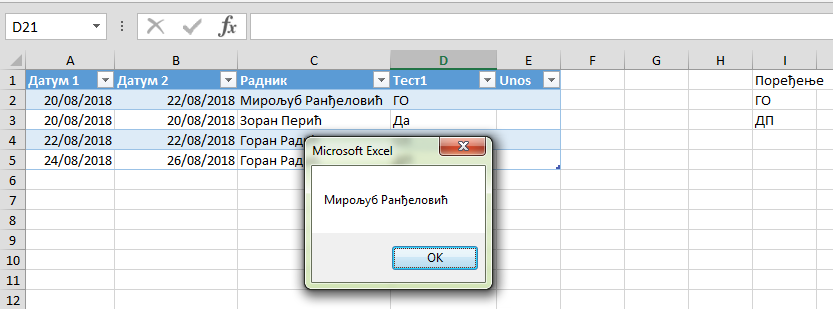
Logika je ista. Znaci treba da se promene sistemski parametri i postavi za non-unicode programs da se koristi nasa cirilica.
Evo primer
Takodje ima i screenshot u nastavku kao dokaz.
Evo primer
Code:
MsgBox Cells(2, 3) ' Vrednost tog polja je cirilicno ispisano 'Miroljub Randjelovic'
MsgBox Cells(2, 3) ' Vrednost tog polja je cirilicno ispisano 'Miroljub Randjelovic'
Takodje ima i screenshot u nastavku kao dokaz.