(nadam se da postujem u pravu temu)
Prvi put instaliram i setujem Wordpress.org. Zakucao sam se. Instalirao sam XAMPP (kako bih imao Apache web server, MySQL i PHP), zatim PHP editor Eclipse i Wordpress.org. Wordpress org zahteva da imam web server. Napominjem da ni sa jednim ovim alatom nikad nisam radio.
Iz XAMPP Control Panela pokrenuo sam Apache i MySQL. Ništa nisam dirao od parametara. Default.
Evo detaljnog uputstva sa Wordpress.org sajta oko ovog fajla. Evo sadržaja wp-config-sample.php fajla koji povezuje WP sa bazom. Popunio sam ovaj fajl prema uputstvu sa linka, snimio kao wp-config.php:
Međutim, ne znam šta treba da uradim u XAMPP-u da bih to povezao. Ovako, naravno, dobijam poruku da postoji greška:
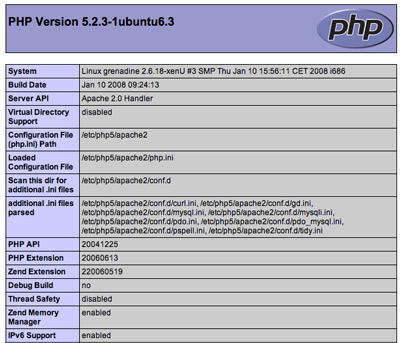
XAMPP u statusu kaže da je PHP activated. Verovatno treba da ispodešavam MySQL ali ne znam kako. Help!
Prvi put instaliram i setujem Wordpress.org. Zakucao sam se.
Instalirao sam XAMPP (kako bih imao Apache web server, MySQL i PHP), zatim PHP editor Eclipse i Wordpress.org. Wordpress org zahteva da imam web server. Napominjem da ni sa jednim ovim alatom nikad nisam radio.Iz XAMPP Control Panela pokrenuo sam Apache i MySQL. Ništa nisam dirao od parametara. Default.
Evo detaljnog uputstva sa Wordpress.org sajta oko ovog fajla. Evo sadržaja wp-config-sample.php fajla koji povezuje WP sa bazom. Popunio sam ovaj fajl prema uputstvu sa linka, snimio kao wp-config.php:
Code:
// ** MySQL settings - You can get this info from your web host ** //
/** The name of the database for WordPress */
define('DB_NAME', 'database_name_here');
/** MySQL database username */
define('DB_USER', 'username_here');
/** MySQL database password */
define('DB_PASSWORD', 'password_here');
/** MySQL hostname */
define('DB_HOST', 'localhost');
/** Database Charset to use in creating database tables. */
define('DB_CHARSET', 'utf8');
/** The Database Collate type. Don't change this if in doubt. */
define('DB_COLLATE', '');
/**#@+
* Authentication Unique Keys and Salts.
*
* Change these to different unique phrases!
* You can generate these using the {@link https://api.wordpress.org/secret-key/1.1/salt/ WordPress.org secret-key service}
* You can change these at any point in time to invalidate all existing cookies. This will force all users to have to log in again.
*
* @since 2.6.0
*/
define('AUTH_KEY', 'put your unique phrase here');
define('SECURE_AUTH_KEY', 'put your unique phrase here');
define('LOGGED_IN_KEY', 'put your unique phrase here');
define('NONCE_KEY', 'put your unique phrase here');
define('AUTH_SALT', 'put your unique phrase here');
define('SECURE_AUTH_SALT', 'put your unique phrase here');
define('LOGGED_IN_SALT', 'put your unique phrase here');
define('NONCE_SALT', 'put your unique phrase here');
/**#@-*/
/**
* WordPress Database Table prefix.
*
* You can have multiple installations in one database if you give each a unique
* prefix. Only numbers, letters, and underscores please!
*/
$table_prefix = 'wp_';
/**
* WordPress Localized Language, defaults to English.
*
* Change this to localize WordPress. A corresponding MO file for the chosen
* language must be installed to wp-content/languages. For example, install
* de_DE.mo to wp-content/languages and set WPLANG to 'de_DE' to enable German
* language support.
*/
define('WPLANG', '');
// ** MySQL settings - You can get this info from your web host ** //
/** The name of the database for WordPress */
define('DB_NAME', 'database_name_here');
/** MySQL database username */
define('DB_USER', 'username_here');
/** MySQL database password */
define('DB_PASSWORD', 'password_here');
/** MySQL hostname */
define('DB_HOST', 'localhost');
/** Database Charset to use in creating database tables. */
define('DB_CHARSET', 'utf8');
/** The Database Collate type. Don't change this if in doubt. */
define('DB_COLLATE', '');
/**#@+
* Authentication Unique Keys and Salts.
*
* Change these to different unique phrases!
* You can generate these using the {@link https://api.wordpress.org/secret-key/1.1/salt/ WordPress.org secret-key service}
* You can change these at any point in time to invalidate all existing cookies. This will force all users to have to log in again.
*
* @since 2.6.0
*/
define('AUTH_KEY', 'put your unique phrase here');
define('SECURE_AUTH_KEY', 'put your unique phrase here');
define('LOGGED_IN_KEY', 'put your unique phrase here');
define('NONCE_KEY', 'put your unique phrase here');
define('AUTH_SALT', 'put your unique phrase here');
define('SECURE_AUTH_SALT', 'put your unique phrase here');
define('LOGGED_IN_SALT', 'put your unique phrase here');
define('NONCE_SALT', 'put your unique phrase here');
/**#@-*/
/**
* WordPress Database Table prefix.
*
* You can have multiple installations in one database if you give each a unique
* prefix. Only numbers, letters, and underscores please!
*/
$table_prefix = 'wp_';
/**
* WordPress Localized Language, defaults to English.
*
* Change this to localize WordPress. A corresponding MO file for the chosen
* language must be installed to wp-content/languages. For example, install
* de_DE.mo to wp-content/languages and set WPLANG to 'de_DE' to enable German
* language support.
*/
define('WPLANG', '');
Međutim, ne znam šta treba da uradim u XAMPP-u da bih to povezao. Ovako, naravno, dobijam poruku da postoji greška:
Citat:
Error: PHP is not running
WordPress requires that your web server is running PHP. Your server does not have PHP installed, or PHP is turned off.
WordPress requires that your web server is running PHP. Your server does not have PHP installed, or PHP is turned off.
XAMPP u statusu kaže da je PHP activated. Verovatno treba da ispodešavam MySQL ali ne znam kako. Help!